Adding your first tasks
Tasks are the foundation of Mood2do. Here's how to add them and what each field means.
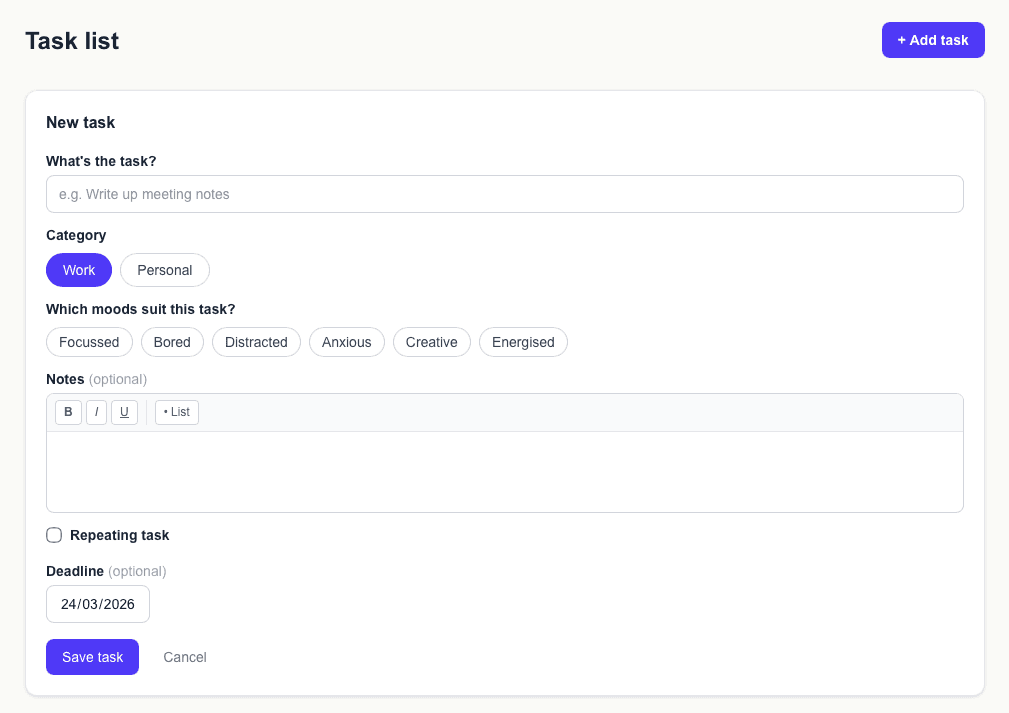
Where to add tasks
Go to Task list in the navigation menu. You'll see a list of all your tasks and an "+ Add task" button in the top right.
Click it to open the add form.
Filling in the form
Each task has a few fields:
- —Title — what the task actually is. Keep it specific enough that you know what to do when you see it.
- —Category — Work or Personal. This determines which page the task appears on.
- —Mood tags — which moods suit this task (see the Mood tags guide for more).
- —Deadline — only set this if the task genuinely has one. Don't fake deadlines to force yourself.
- —Notes — extra detail, context, or links. Supports bold, italic, and bullet lists.
Repeating tasks
If a task happens regularly — a weekly report, a daily check-in — tick "Repeating task" and set a frequency and date range. Mood2do will generate the full series automatically.
How many tasks should I add?
Add as many as you like — but don't feel you need to add everything at once. Start with the things that are actually on your mind right now. You can always add more later.
Free accounts can hold up to 25 tasks. Pro accounts are unlimited.