Starting and timing a task
When you find a task you can do right now, the timer helps you stay on it — and builds up a picture of how you work.
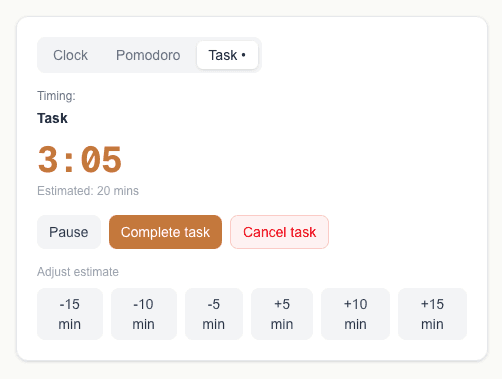
Starting a task
On your task list, each task has an "I'll do this" button. Hitting it starts the timer and switches the timer widget to the Task tab so you can see it running.
While the timer is running
You have three options while a task is active:
- —Pause — stops the clock without abandoning the task. Hit Resume to carry on.
- —Complete task — marks the task as done and saves the timing data.
- —Cancel task — stops the timer and puts the task back in your list without marking it complete.
Adjusting the estimate
Every task has an estimated time. If you're running over — or realise it'll take less time than you thought — use the +/- buttons on the Task tab to adjust the estimate mid-task.
These adjustments are recorded and show up in your Insights so you can see where your estimates tend to go wrong.
Why does timing matter?
Every task you time contributes to your Insights. Over time, Mood2do builds up a picture of which moods lead to your fastest work, when you tend to underestimate, and when you're most productive.
The more you use it, the more useful it becomes.